Business process automation helps companies reduce repetitive work, connect existing software and access important information without constantly switching between different applications.
Automation is not just for large organizations. Small businesses can also benefit from custom software solutions designed around their specific workflows.
Here are seven practical ways to automate everyday business operations, including a real example of a custom desktop application connected to a CRM and email system through an API.
Automate Email Tracking and Management
Email remains one of the most widely used communication channels for businesses.
However, repeatedly checking an inbox can interrupt productive work and make it difficult to focus on important tasks.
Email automation can help businesses:
- Track sent and received emails automatically.
- Detect customer replies and link them to CRM records.
- Monitor daily outreach activity.
- Display communication statistics in a dashboard.
- Receive notifications when new customer responses arrive.
Instead of opening an email client throughout the day, employees can monitor key communication metrics in one place.
Connect Your CRM to Other Business Applications
A Customer Relationship Management (CRM) system helps businesses organize customer information, sales opportunities and communication history.
Its value can increase significantly when connected to other tools.
Using an API (Application Programming Interface), businesses can integrate a CRM with email services, website forms, booking systems and custom desktop applications.
For example, when a customer submits an inquiry through a website, the information can automatically appear in the CRM without requiring manual data entry.
These integrations help reduce duplicate work and keep information consistent across different systems.
Real Example: A Custom Desktop Dashboard Connected to CRM and Email
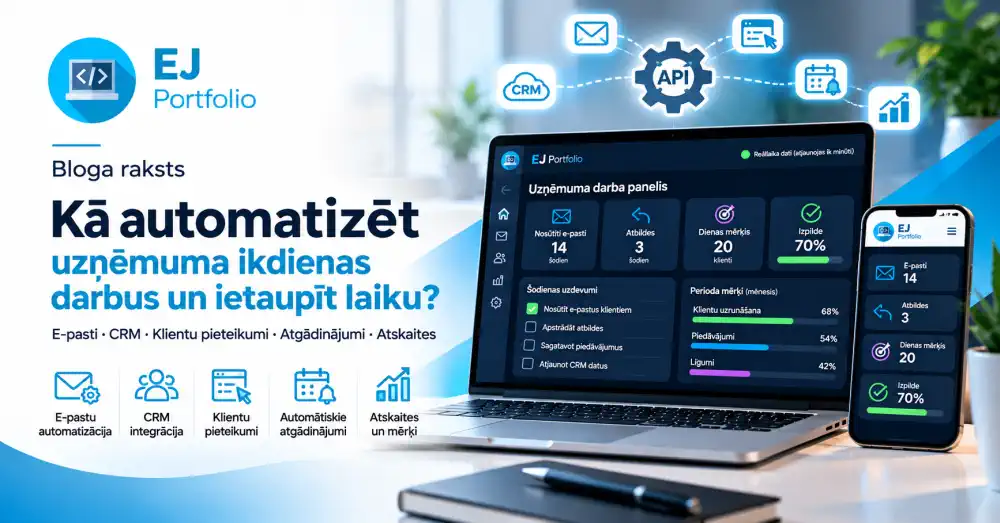
One practical example of business automation is a custom desktop application I developed to monitor everyday business activity.
The application connects to a CRM database and email-related systems through an API, bringing important information into a single dashboard.
The main goal is simple: see what matters without constantly opening different applications.
What does the dashboard display?
When I start my computer, I can immediately monitor:
- Emails sent today: The number of outgoing messages recorded for the current day.
- Customer replies: Responses received from contacted customers.
- Daily goals: Targets that need to be achieved today.
- Daily tasks: Tasks that are completed or still pending.
- Period goals: Progress toward longer-term targets.
- Goal completion: A visual overview of actual results compared with planned targets.
The application refreshes its data approximately once every minute.
This provides a near-real-time overview of business activity without requiring me to repeatedly check my inbox or open the CRM.
Why is this useful?
Imagine a small business that aims to contact 20 potential customers each day.
Without automation, the owner might manually count sent emails, check for responses and update a spreadsheet to track progress.
With a connected dashboard, the same information could look like this:
- Daily outreach goal: 20 contacts.
- Emails sent: 14.
- Remaining target: 6.
- Customer replies received: 3.
- Goal completion: 70%.
These are illustrative figures, but they demonstrate how a dashboard can simplify daily performance tracking.
Instead of spending time gathering information, the business owner can focus on completing tasks and responding to customers.
This type of solution can be particularly useful for sales teams, freelancers, small business owners and project managers.
Automate Customer Inquiries and Website Forms
When a potential customer submits a form on a business website, several actions usually need to happen.
Someone must review the message, register the customer, respond to the inquiry and ensure it receives proper follow-up.
A connected system can automate much of this workflow.
For example, a website inquiry can automatically:
- Create a new CRM record.
- Send a confirmation email to the customer.
- Notify the responsible employee.
- Assign a status to the inquiry.
- Store the communication history.
This helps businesses organize incoming requests and reduces the risk of overlooking potential customers.
Set Up Automatic Reminders and Notifications
Many businesses regularly send similar reminders to customers or employees.
These may include booking confirmations, appointment reminders, order updates or notifications about upcoming deadlines.
With automation, these messages can be triggered by specific events, dates or changes in status.
For example, a booking system can automatically send a reminder one day before a customer's scheduled arrival.
Similarly, a service business can notify a customer when an order is completed or an appointment is approaching.
Automatic reminders can improve communication consistency while reducing administrative work.
Generate Business Reports Automatically
Business owners need accurate information to understand performance and make decisions.
However, collecting information from multiple applications can be time-consuming.
A custom reporting dashboard can automatically combine data such as:
- Daily, weekly and monthly performance.
- Number of customer inquiries.
- Sent emails and customer responses.
- Completed and pending tasks.
- Progress toward business goals.
- Comparison of planned and actual results.
Reports can be presented through charts, tables, progress indicators or downloadable documents.
Instead of manually preparing the same report every week, employees can access updated information whenever needed.
Build Custom Integrations Between Existing Systems
Businesses do not always need to replace their existing software to improve efficiency.
In many cases, connecting the tools they already use can deliver meaningful improvements.
Examples include:
- Connecting a website to a CRM.
- Synchronizing email activity with a customer database.
- Integrating a booking system with automated notifications.
- Connecting inventory management with customer orders.
- Displaying information from several systems in one desktop dashboard.
Custom API integrations allow businesses to build workflows around their actual operational needs.
However, integrations depend on the capabilities and permissions provided by each system. Secure authentication, access controls and appropriate data protection are essential.
How Much Time Can Business Automation Save?
The amount of time saved depends on the process being automated and how often it is performed.
Consider a simple example.
An employee spends 30 minutes per day checking information across different systems.
After introducing a connected dashboard, the same activity takes 10 minutes.
That represents a saving of 20 minutes per working day.
Across 22 working days, the total saving would be approximately 7 hours and 20 minutes per month.
This is an illustrative calculation rather than a guaranteed outcome, but it demonstrates how small improvements can add up over time.
Is Business Process Automation Worth It for Small Businesses?
Yes, particularly when employees repeatedly perform the same administrative tasks.
The most effective approach is often to start with one specific problem rather than attempting to automate everything at once.
For example, a business might begin by automating customer inquiries or connecting its CRM to email.
Once the initial solution is working reliably, additional features can be introduced.
Custom software also makes it possible to develop only the functionality a business actually needs.
Final Thoughts: Let Technology Work for Your Business
Business process automation is about more than reducing manual tasks.
It can help companies organize information, respond to customers more efficiently, track performance and make better-informed decisions.
Even a relatively simple desktop application connected to a CRM and email system can change how a business monitors its daily operations.
At EJ Portfolio, I develop custom business software, API integrations and workflow automation solutions tailored to individual business needs.
Whether you want to automate customer inquiries, connect existing systems or create a personalized business dashboard, the right solution starts with understanding your workflow.
Have a repetitive process that takes too much time? Let's explore how automation could make your business more efficient.
Explore Business Process Automation
All articles